Show all chapters ▸Hide chapters ▾
- 1PLM History 101: PDM (Part 1) - Evolution of Assembly Modeling into PDM Systems - PTC (1980s–1990s)
- 2PLM History 101: PDM (Part 2) Evolution of Assembly Modeling into PDM Systems - Unigraphics (1990s–2000s)
- 3PLM History 101: PDM (Part 3) IBM’s ProductManager and Dassault’s VPM: The CATIA Journey
- 4PLM History 101: PDM (Part 4) Mid-Market Solutions: SolidWorks PDM and Autodesk Vault (2000s)
- 5History 101: PDM (Part 5) - Dassault Systèmes VPM V5, CATIA V5, and SmarTeam in the 2000s
- 6PLM History 101: PDM (Part 6) - Toward PLM and the Digital Thread
Key Takeaways
- SolidWorks acquired PDMWorks in 2004
- PDMWorks integrated SolidWorks assembly files
- Enterprise PDM introduced scalable workflows in 2006
- Autodesk Vault managed Inventor .iam and .ipt files
- Vault offered Basic, Workgroup, Professional tiers
🎧 Audio Version
Listen to "PLM History 101: PDM (Part 4) Mid-Market Solutions: SolidWorks PDM and Autodesk Vault (2000s)"
More audio articles at DemystifyingPLM/listen
Short Answer
SolidWorks and Autodesk introduced PDM tools to address data management challenges faced by mid-market CAD users in the early 2000s, allowing them to manage assemblies and revisions more effectively.
- SolidWorks integrated PDM capabilities starting around 2003
- Autodesk Vault was a key PDM solution for Autodesk users
- These tools helped smaller companies streamline their product development processes
- The introduction of PDM facilitated better collaboration and version control
Why it matters: For PLM practitioners, these mid-market solutions marked the expansion of PDM into more widespread use, enhancing data management practices across a broader range of organizations.
As PDM capabilities matured at the high end, they also trickled down to the mid-market CAD world in the late 1990s and early 2000s. Many smaller companies using CAD now faced similar challenges managing assemblies and revisions, albeit on a smaller scale. Two representative examples are SolidWorks and Autodesk, which introduced PDM tools to complement their popular CAD offerings for mainstream users.
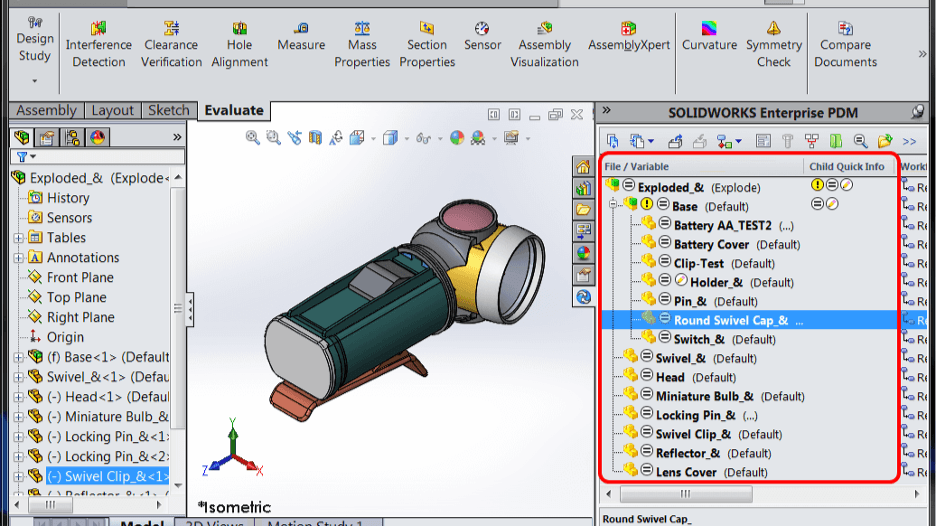
SolidWorks, founded in 1995, initially had no proprietary PDM – the focus was on ease-of-use in CAD. By the early 2000s, however, even SolidWorks users needed data management. In 2004, SolidWorks acquired a PDM product called PDMWorks and began bundling it with their Office Professional package. PDMWorks was a vault system that integrated into SolidWorks CAD and was deliberately kept simple for ease of use. Using PDMWorks, small engineering teams could securely check files into a vault, maintain version history, and let multiple people collaborate on assemblies without stepping on each other’s toes. PDMWorks automatically understood SolidWorks assembly files: if you checked in an assembly, it would find all the referenced part and drawing files and store them together. This prevented the infamous problem of “broken links” when someone renamed a file on disk – in the vault, references were updated consistently. As one description put it, such a PDM “can ‘see’ and manage the relationships between files, automatically updating file references and BOMs as needed.” In practice, that meant a SolidWorks assembly’s bill-of-materials could be instantly listed from the PDM database, and if a part file moved locations or got a new name, the system would keep the assembly’s link intact.
SolidWorks later expanded its PDM offering by releasing Enterprise PDM (EPDM) in 2006–2007. (EPDM was based on technology from an acquisition of a company named Conisio.) Enterprise PDM was more scalable and featured a SQL database back-end, making it suitable for larger SolidWorks deployments. It introduced workflows, approvals, and more sophisticated BOM management while still integrating directly with the SolidWorks CAD UI. By 2008, many SolidWorks users had either PDMWorks or EPDM in place to manage their CAD data. The principles remained the same as in the high-end systems, just streamlined: a secure vault, knowledge of assembly-part relationships, version control, and search/reuse capabilities. SolidWorks PDM could generate a structured BOM from an assembly, manage drawing references, and ensure that using an updated part in an assembly was a deliberate action (through revision control). For mid-market companies, this was transformative – they gained control over their CAD data without needing the IT overhead of something like ENOVIA or Teamcenter.
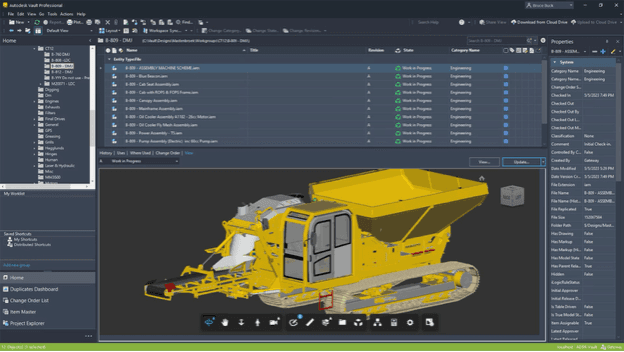
Meanwhile, Autodesk, known for AutoCAD and later Inventor, also recognized the need for PDM. As Autodesk entered the 3D mechanical design space with Inventor (launched 1999) and as projects grew collaborative, they introduced Autodesk Vault in the 2000s as a built-in PDM for their customers. Vault was designed to be a “comprehensive data management tool” for Autodesk design files, handling organization, sharing, and tracking of design data across teams. It was simpler than the high-end PLM systems, focusing on core needs: a central repository (typically using Microsoft SQL Server), user access controls, version history, and search. For assembly modeling, Autodesk Vault recognized Inventor assembly (.iam) files and their linked part (.ipt) files, similar to how SolidWorks PDM recognized its assemblies. Vault would automatically capture the BOM structure from an Inventor assembly and could present that structure to users, or even allow a CAD user to do a “where used” query to see all assemblies a part was in. Autodesk initially offered Vault Basic (included with Inventor) and later scaled it up with Vault Workgroup and Vault Professional for more features. By around 2007, Autodesk Vault had become a standard part of the mid-range CAD toolkit, giving smaller companies a taste of PDM’s benefits in managing assembly relationships and revisions .
One common thread in these mid-market PDM tools (SolidWorks PDM, Autodesk Vault, as well as others like PTC’s Windchill-based Pro/INTRALINK 8/x for SMEs) is that they made PDM more accessible. They often came pre-integrated with the CAD software and had simpler installation and configuration. The focus was on solving everyday problems: making sure everyone is working on the correct version of a part, allowing reuse of parts across different projects, and ensuring that when an assembly is opened, all its children load correctly and quickly. These systems also introduced more CAD-aware features – for instance, Vault and SolidWorks EPDM both allowed users to rename files or reorganize folders without breaking assembly links, because the PDM managed the unique IDs and references behind the scenes. They also often included BOM export features, where the assembly structure in the PDM could be exported to Excel or an ERP system to be used in manufacturing planning.
While not as powerful as the enterprise PLM platforms, mid-market PDMs in the 2000s adopted many of the same principles. They used databases to store metadata and relationships, file servers or vaults to store content, and they enforced check-in/check-out for concurrency control. They recognized the need for spatial data management too – for example, Vault could store DWF viewables of 3D assemblies for lightweight web viewing, and SolidWorks PDM supported eDrawings or 3D PDF outputs. In short, by the end of the 2000s, even smaller engineering teams had the tools to manage complex assemblies with dozens or hundreds of parts, track revisions rigorously, and generate accurate BOMs, all without resorting to manual methods.
Show all chapters ▸Hide chapters ▾
- 1PLM History 101: PDM (Part 1) - Evolution of Assembly Modeling into PDM Systems - PTC (1980s–1990s)
- 2PLM History 101: PDM (Part 2) Evolution of Assembly Modeling into PDM Systems - Unigraphics (1990s–2000s)
- 3PLM History 101: PDM (Part 3) IBM’s ProductManager and Dassault’s VPM: The CATIA Journey
- 4PLM History 101: PDM (Part 4) Mid-Market Solutions: SolidWorks PDM and Autodesk Vault (2000s)
- 5History 101: PDM (Part 5) - Dassault Systèmes VPM V5, CATIA V5, and SmarTeam in the 2000s
- 6PLM History 101: PDM (Part 6) - Toward PLM and the Digital Thread
Looking up PLM terminology? Browse the canonical reference.
PLM Glossary →Cite this article
Finocchiaro, Michael. “PLM History 101: PDM (Part 4) Mid-Market Solutions: SolidWorks PDM and Autodesk Vault (2000s).” DemystifyingPLM, July 25, 2025, https://www.demystifyingplm.com/plm-history-101-pdm-part-4-mid-market-solutions-solidworks-pdm-and-autodesk-vault-2000s
Michael Finocchiaro (opens in a new tab)
PLM industry analyst · 35+ years at IBM, HP, PTC, Dassault Systèmes
Firsthand knowledge of the evolution from early 3D modeling kernels to today's cloud-native platforms and agentic AI — the history, strategy, and future of PLM.
Related Articles
PLM History 101: PDM (Part 6) - Toward PLM and the Digital Thread
Aug 3, 2025 · 4 min read
History 101: PDM (Part 5) - Dassault Systèmes VPM V5, CATIA V5, and SmarTeam in the 2000s
Jul 9, 2025 · 1 min read
PLM History 101: PDM (Part 2) Evolution of Assembly Modeling into PDM Systems - Unigraphics (1990s–2000s)
Jul 9, 2025 · 3 min read