Key Takeaways
- The cloud vs. on-premise decision is primarily an organizational and risk decision, not a technical one
- SaaS PLM vendors are converging on configuration-over-customization models that reduce (but do not eliminate) fit gaps
- Hybrid deployment—cloud for collaboration and visualization, on-premise for CAD vaulting and sensitive IP—is increasingly common
- Upgrade debt on legacy on-premise PLM is one of the most common hidden costs in manufacturing IT portfolios
- Defense, aerospace, and regulated pharma customers have legitimate reasons to stay on-premise that market trends do not override
Short Answer
Cloud PLM (SaaS) shifts cost from CapEx to OpEx, accelerates upgrades, and removes infrastructure burden—but limits customization and requires trust in the vendor's data security posture. On-premise PLM offers maximum control, deep customization, and data sovereignty, but demands significant IT investment and disciplines upgrade management. Neither is universally better; the right choice is determined by your security requirements, IT capacity, budget structure, and how much you are willing to adapt your processes to software versus adapting software to your processes.
- Cloud PLM (SaaS) converts capital expense to operating expense and eliminates on-premise infrastructure management
- On-premise PLM gives maximum control over data, integrations, and customization but requires significant internal IT capability
- Upgrade cycles are fundamentally different: cloud pushes continuous updates, on-premise requires planned upgrade projects every 3–5 years
- Total Cost of Ownership (TCO) comparisons are misleading if they ignore internal labor, infrastructure, and opportunity costs
- Data sovereignty, regulatory compliance, and security classification drive many organizations toward on-premise regardless of cost
Cloud PLM vs On-Premise PLM: Deployment Models, Costs, and Trade-offs
Every PLM vendor has a cloud story now. PTC has Windchill+. Siemens has Teamcenter X. Dassault has 3DEXPERIENCE on cloud. Aras runs on Azure. The marketing message is consistent: cloud PLM is the modern choice, on-premise is legacy, and the only question is when you are making the move.
This framing is wrong—or at least incomplete. For some companies, cloud PLM is the right choice for reasons that have nothing to do with trend-following. For others, on-premise deployment remains the defensible answer given their security requirements, regulatory environment, or integration complexity. And for a growing number, hybrid deployment is where reality lands.
The purpose of this article is to give you the framework for making this decision honestly, based on your organization's actual constraints rather than vendor narratives or analyst reports written for median companies that are not your company.
What "Cloud PLM" Actually Means
The term "cloud PLM" covers at least three distinct deployment models that are often conflated:
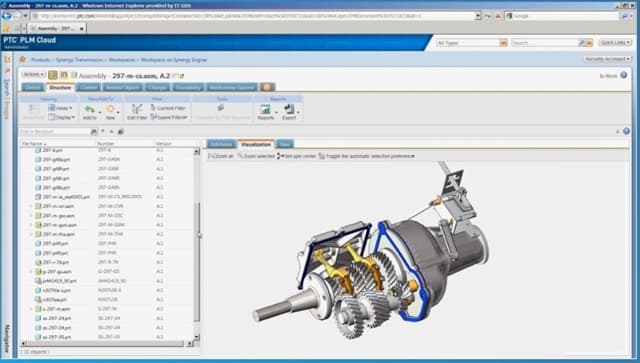
SaaS (Software as a Service): The vendor hosts, manages, and upgrades everything. You access the application via web browser. You pay a subscription. You do not manage servers, databases, or upgrade projects. PTC Windchill+, Siemens Teamcenter X, and Dassault 3DEXPERIENCE on cloud are SaaS offerings. This is "true cloud."
Vendor-Hosted (Managed Cloud): Your PLM instance runs on cloud infrastructure (AWS, Azure, GCP) managed by the vendor or a partner, but it is your dedicated instance. You still handle upgrade scheduling and pay for compute separately. This is cloud infrastructure, not SaaS—and the distinction matters because you still own upgrade decisions.
Customer-Hosted Cloud (IaaS): You lift-and-shift your on-premise PLM installation to a cloud virtual machine. AWS or Azure replaces your physical data center, but the software, database, and operational model are unchanged. This is infrastructure modernization, not cloud PLM in any meaningful sense.
When vendors say "cloud PLM," they typically mean SaaS. When customers say they are "moving to cloud," they frequently mean IaaS lift-and-shift. Ensure you are having the same conversation.
The Deployment Comparison
| Dimension | Cloud SaaS PLM | On-Premise PLM |
|---|---|---|
| Infrastructure ownership | Vendor | Customer |
| Upgrade cycle | Continuous (vendor-managed) | Planned projects every 3–5 years |
| Upfront cost | Low (subscription) | High (perpetual license + hardware) |
| Ongoing cost model | OpEx (predictable) | CapEx + maintenance + IT labor |
| Customization depth | Low-to-moderate (configuration) | High (code-level customization possible) |
| Integration flexibility | API-first, standardized | Deep, proprietary integration possible |
| Data location | Vendor data center | Customer-controlled |
| CAD file performance | Network-dependent | Local network (typically faster) |
| IT team burden | Low | High |
| Regulatory compliance | Vendor's certifications | Customer-managed |
| Time to go live | Faster (weeks to months) | Slower (months to years) |
| Vendor lock-in risk | High | Moderate |
Cost Comparison: CapEx vs OpEx
The financial model shift from on-premise to SaaS is as significant as the technical shift. On-premise PLM historically required:
- Perpetual software licenses (often 5,000+ per user depending on product and tier)
- Annual maintenance (typically 18–22% of license value per year)
- Server hardware refreshed every 4–6 years
- Database administration labor (often 0.5–1.0 FTE for a mature PLM installation)
- Upgrade projects every 3–5 years, typically costing 1M+ depending on system complexity and customization depth
SaaS PLM converts most of this to a recurring subscription (typically 500+ per user per month depending on tier and vendor), which includes infrastructure, maintenance, and upgrades. The subscription eliminates upgrade project costs and infrastructure refresh cycles.
Where on-premise wins on cost: Organizations that have already paid for perpetual licenses and run minimal customizations often find on-premise cheaper over a 10+ year horizon when licenses are fully depreciated. Organizations with existing IT infrastructure that has spare capacity also see lower marginal costs.
Where SaaS wins on cost: Organizations with heavy customizations (which make upgrades expensive), organizations that have fallen multiple versions behind (creating upgrade debt), and organizations without dedicated PLM IT staff consistently find SaaS cheaper when total cost is counted honestly—including the internal labor that is rarely tracked against the PLM budget.
Upgrade Cycles: The Hidden Cost of On-Premise
Upgrade cycles are where the on-premise model quietly accumulates its most significant hidden cost. A typical on-premise PLM installation runs 3–7 years between major version upgrades. Each upgrade requires:
- Compatibility testing across all CAD integrations
- Re-testing (and often re-writing) customizations
- User acceptance testing across all workflows
- A parallel migration period where both old and new systems run simultaneously
- Training for new UI and workflow changes
For a complex on-premise PLM installation with significant customization, this upgrade project can cost more than the original implementation. Organizations that skip upgrades accumulate "version debt" that eventually forces a more disruptive migration.
SaaS PLM eliminates this dynamic by delivering continuous updates in smaller increments. New features arrive quarterly or monthly. Compatibility is maintained by the vendor. There is no upgrade project—and no upgrade debt.
The trade-off: you cannot stay on the previous version if you discover a problem with the new one. SaaS upgrade governance is the vendor's responsibility, and customers who require extended validation periods (regulated industries) may find continuous updates difficult to manage.
Data Sovereignty and Security
Data sovereignty is the factor that most often overrides cost arguments for keeping PLM on-premise. The question is simple: where does your product data live, and who can access it?
On-premise keeps data inside your firewall. Your IP, your BOM structures, your design files, your supplier relationships never leave infrastructure you control. For defense contractors with ITAR/EAR obligations, this is often not optional—it is a legal requirement. For companies with highly sensitive IP (novel materials, proprietary processes, competitive product designs), on-premise is a defensible risk management position regardless of vendor security certifications.
SaaS stores data in the vendor's infrastructure. Major PLM vendors operating cloud services have substantial security investments—SOC 2 Type II, ISO 27001, FedRAMP (for US government customers). In many cases, their security posture exceeds what individual manufacturers maintain. But "better security" is different from "data never leaves your control," and for certain threat models and regulatory environments, the distinction is decisive.
When to Choose Cloud PLM
Choose cloud (SaaS) PLM when:
- You lack dedicated PLM IT/infrastructure staff and do not want to hire them
- Your organization has significant upgrade debt on current on-premise PLM
- You are implementing PLM for the first time and want faster time-to-value
- Your CAD assemblies are manageable in size (under ~5,000 parts) and network performance is adequate
- You are a mid-market company where the configuration-over-customization model fits your processes
- Regulatory requirements do not restrict cloud storage of your product data
When to Choose On-Premise PLM
Choose on-premise PLM when:
- You operate under ITAR/EAR, classified program restrictions, or equivalent data sovereignty obligations
- Your processes are sufficiently non-standard that deep PLM customization is required
- You have very large assembly structures (50,000+ parts) where local network access to CAD vaults is a performance requirement
- You have significant existing IT infrastructure and PLM staff whose costs are already covered
- You have complex legacy integrations (homegrown MES, ERP connectors) that are deeply tied to your on-premise architecture
The Hybrid Reality
An increasing number of organizations land on hybrid: on-premise for CAD vaulting and sensitive IP management, cloud for collaboration portals, supplier access, visualization, and downstream processes. This is pragmatic but introduces its own integration complexity—data must flow reliably between the on-premise core and cloud collaboration surfaces.
Related Reading
- PLM vs ERP: Understanding the Difference — How PLM deployment choices affect the ERP integration boundary
- What is PLM? — The foundational definition of PLM before evaluating deployment models
- Windchill vs Teamcenter — How the two largest PLM platforms differ in their cloud strategies
- What is a Digital Thread? — How cloud vs. on-premise affects digital thread architecture
Conclusion
Cloud PLM is not inherently better than on-premise PLM. It is a different set of trade-offs that favors different organizational profiles. The organizations that make this decision well are the ones that evaluate it honestly against their actual security requirements, IT capacity, budget structure, and upgrade tolerance—not against vendor roadmaps or analyst market share charts.
The decision is not permanent, but reversing it is expensive. Get it right the first time by asking the hard questions before the contract is signed.
Want to listen instead of read? 56 DemystifyingPLM articles are available as audio.
Browse audio →Looking up PLM terminology? Browse the canonical reference.
PLM Glossary →Cite this article
Finocchiaro, Michael. “Cloud PLM vs On-Premise PLM: Deployment Models, Costs, and Trade-offs.” DemystifyingPLM, October 28, 2022, https://www.demystifyingplm.com/plm-cloud-vs-onprem
Michael Finocchiaro (opens in a new tab)
PLM industry analyst · 35+ years at IBM, HP, PTC, Dassault Systèmes
Firsthand knowledge of the evolution from early 3D modeling kernels to today's cloud-native platforms and agentic AI — the history, strategy, and future of PLM.